OpenSpec owns the what (spec truth). Superpowers owns the how (execution discipline). Both are strong alone. Stack them naively in one session and three frictions appear: duplicated artifacts (brainstorm lands in docs/superpowers/specs/ while OpenSpec rewrites design.md), split task trackers (coarse tasks.md vs TDD micro-steps in plan.md), and manual orchestration (you decide which skill to invoke at every step).
The fix is not patching Superpowers source or rewriting opsx SKILL.md files. Use OpenSpec’s documented customization surface—especially Custom Schemas. The community schema superpowers-bridge is the working example: integrate at the prompt/schema layer without changing either upstream.
For “who owns which layer” across OpenSpec / Superpowers / gstack, see the earlier three-layer delivery stack. This post is about making compatibility real through official customization.
OpenSpec’s three customization levels
Customization defines three tiers:
| Level | What it does | Best for |
|---|---|---|
| Project Config | Default schema, inject context / per-artifact rules | Most teams |
| Custom Schemas | Own artifact graph, templates, instructions, deps | Unique processes |
| Global Overrides | User-level schemas shared across projects | Power users |
Project Config (openspec/config.yaml) is the lightest path: set a default schema:, a global context:, and rules: keyed by artifact id. Context lands in every artifact prompt; rules only for the matching artifact. Most “TypeScript + proposals need a rollback plan” constraints stop here.
Custom Schemas change the shape of the workflow. Keep schema.yaml + templates/ under openspec/schemas/<name>/:
openspec schema fork spec-driven my-workflow
# or
openspec schema init research-first
openspec schema validate my-workflow
Resolution order: --schema CLI → change metadata → config.yaml → default spec-driven. Debug with openspec schema which --all.
Global Overrides (e.g. ~/.local/share/openspec/schemas/) help individuals reuse schemas; project-level schemas remain preferred—versioned with the repo and CI-checkable.
Rule of thumb: Config for tone and defaults; Custom Schema for artifact graphs and skill orchestration.
Why Superpowers needs a Custom Schema
The bridge README rejects two shortcuts:
- Custom fields in
config.yaml(e.g. imaginedskill_bindings) — CLI ignores them; no validation, no discoverability, and you still edit multiple SKILL files. - Editing opsx skill files — invasive for every change and wiped on SKILL.md upgrades.
A Custom Schema uses the native project mechanism: CLI validates structure, openspec schemas lists it, each change can pick --schema spec-driven or --schema superpowers-bridge, and no existing SKILL.md is modified. Integration is prompt-layer: artifact instruction blocks invoke Superpowers via the Skill tool and redirect outputs (brainstorming must write brainstorm.md in the change folder, not docs/superpowers/specs/).
OpenSpec also maintains a Community Schemas table: superpowers-bridge, like nanopm and e2e-runbooks, stays out of core, ships on its own cadence, and is copied into a project. That is the engineering shape of “perfect compatibility”: contract in schema, implementation in separate repos.
Focus: the Artifact DAG
Relative to built-in spec-driven, superpowers-bridge encodes spec governance and execution skills in one dependency graph. The diagram below is file-existence dependencies (requires: edges the OpenSpec graph engine understands)—not a vibes-based narrative order.
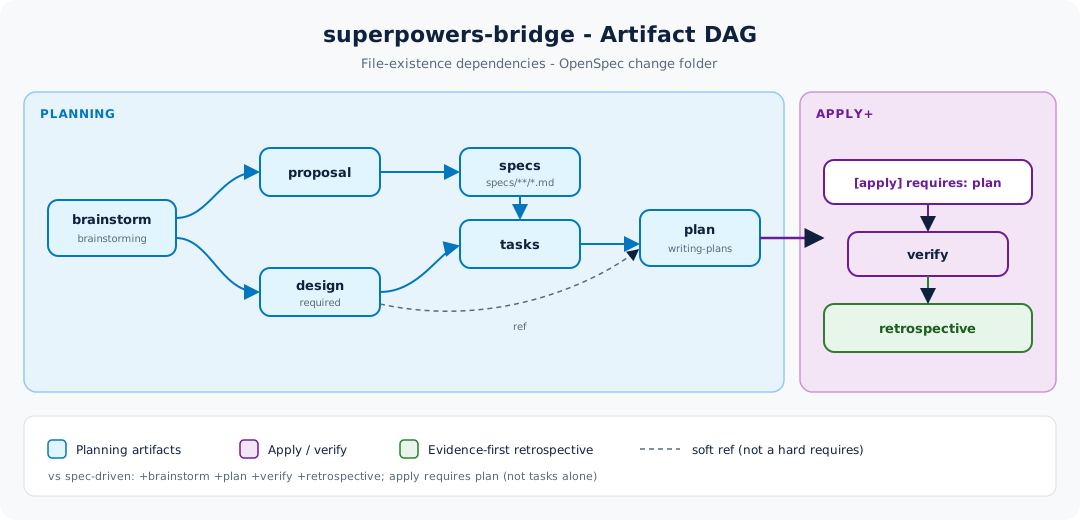
ASCII (matches upstream README):
brainstorm ──┬──→ proposal ──→ specs ──┐
             │                         ├──→ tasks ──→ plan ──→ [apply] ──→ verify ──→ retrospective
             └──→ design ──────────────┘
Key differences from spec-driven:
| spec-driven | superpowers-bridge | |
|---|---|---|
| Entry | proposal | brainstorm (invokes brainstorming) |
| Plan layer | tasks (coarse) | tasks + plan (TDD micro-steps) |
| apply requires | tasks | plan |
| apply method | task-by-task | worktree + subagent-driven-development (TDD + code-review transitive) |
| Post-apply | (none) | verify + retrospective |
| New artifacts | — | brainstorm, plan, verify, retrospective |
design is required in the bridge: it reorganizes raw brainstorm output into Context / Goals / Decisions / Risks / Migration. tasks and plan reference it; the dashed ref edge is not a hard requires.
Apply lifecycle (runtime order)
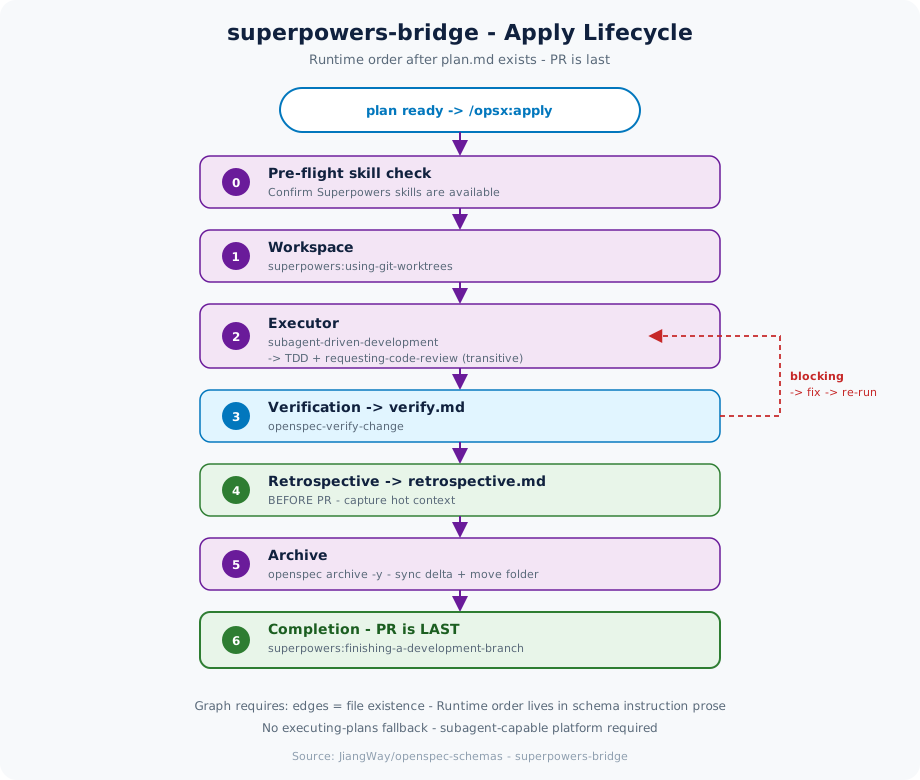
The DAG only answers “which files must exist.” Apply itself is an ordered sequence; verify.md / retrospective.md hang on the graph but are produced inside that orchestration.
Takeaways:
- PR is last—retrospective and archive finish first so the PR diff includes the full change memory.
- verify failure → fix → re-verify, not “checkboxes done equals done.”
- The schema does not fall back to
executing-plans: you need a subagent-capable platform (Claude Code, Codex, …). Otherwise use built-inspec-drivenrather than silently losing transitive TDD/review.
Seven Superpowers touchpoints and output redirection
| # | Skill | Where | Trigger |
|---|---|---|---|
| 1 | brainstorming | brainstorm artifact | Direct (with PRECHECK) |
| 2 | writing-plans | plan artifact | Direct (with PRECHECK) |
| 3 | using-git-worktrees | apply step 1 | Direct |
| 4 | subagent-driven-development | apply step 2 | Direct |
| 5 | test-driven-development | inside #4 | Transitive |
| 6 | requesting-code-review | inside #4 | Transitive |
| 7 | finishing-a-development-branch | apply step 6 | Direct |
Plus OpenSpec built-in openspec-verify-change (step 3 → verify.md). The retrospective artifact fills an evidence-first gap Superpowers does not cover natively.
Output redirection is the compatibility hinge: after installing the bridge, writing designs to docs/superpowers/specs/ bypasses the schema and orphans artifacts. Correct landing zone: openspec/changes/<change>/.
Light install and entry gates
Installation is copy-the-bundle + validate (see upstream one-shot / bash instructions):
# Conceptually: copy into openspec/schemas/superpowers-bridge/
openspec schema validate superpowers-bridge
# Optional: insert CLAUDE.md routing fragment; confirm Superpowers plugin is installed
Not every change needs a change folder. Ceremony should scale with risk: new capability, breaking change, architecture change → opsx; restoring intended behavior, test backfill, docs, config tweaks → direct PR.
If verbal brainstorming is already underway, promote to /opsx:propose only when five conditions hold: scope locked, major forks resolved, cross-system deps classified, acceptance stateable, conversation converging—and promotion requires a human ack, never auto-open.
Anti-patterns:
- After install, still writing to
docs/superpowers/specs/orplans/ - Promoting with unresolved blocking TBDs
- Opening a full change for typos / timeout tweaks
- Forcing the bridge on a non-subagent runtime and expecting “close enough”
Quick path once the schema is present:
/opsx:ff <change>     # planning artifacts through plan
/opsx:apply
/opsx:verify
/opsx:continue        # → retrospective
/opsx:archive
Close
OpenSpec’s customization surface is already enough to absorb Superpowers: Config for context and rules, Custom Schemas for graphs and skill wiring, Community Schemas for distribution. superpowers-bridge shows compatibility can be Occam-simple—no upstream forks, validated, selectable per change—and adds an evidence-first retrospective.
“Perfect compatibility” is not one binary that merges two tools. It is aligning spec truth and execution discipline on one DAG. The official customization docs are the manual; the Artifact DAG is that manual becoming engineering reality.